
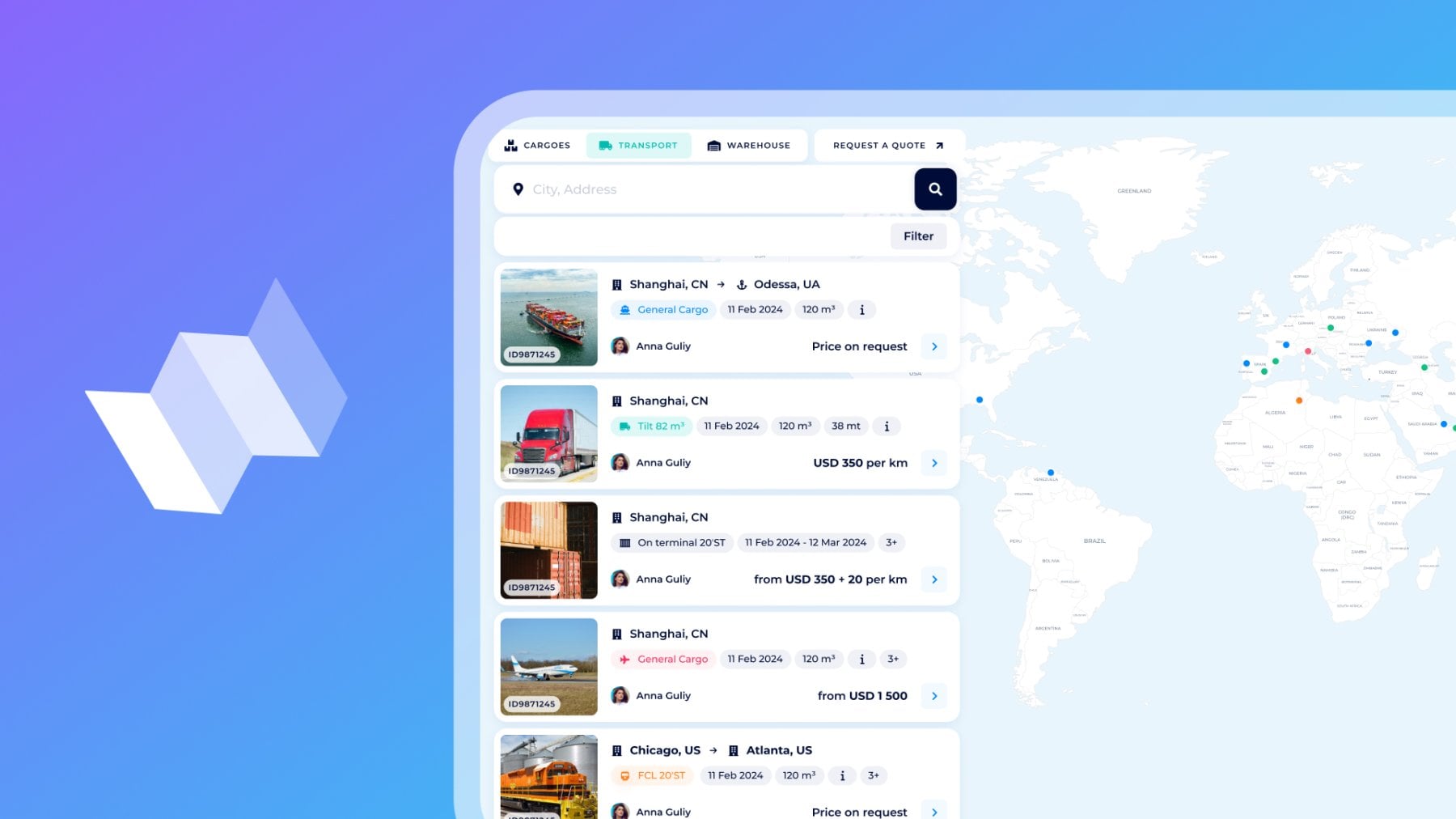
Shippers find transport units for shipping or backhauls right by their requirements, while carriers and asset owners promote their available fleet and get direct booking requests. How does this scenario sound to you?
This is not just a script but the principle of mutual benefits behind Logistics Map Transport, which we will explore in this article.
As from our previous guide of Logistics Map Cargoes, you can book the best shipping option from all available offers or promote your services and attract hot leads, all in one place. Ready to see how it works for transport units? Let’s put your trucks on the map or find the perfect vessel in seconds.
Overview of the "Transport" tab
Open Logistics Map → find the “Transport” tab.
The tool adapts to your role (Shipper or Carrier), whether you're requesting a transport or offering shipping services.
Here, there is a live world map — current international freight market with:
- Available vehicles and equipment (posted by carriers)
- Active transport requests (posted by shippers/forwarders looking for specific units)
Everything updates in real time. Zoom in on Europe, and you’ll see hundreds of trucks in Rotterdam; switch to the U.S. Midwest and spot refrigerators ready for your shipments; jump to the Black Sea and find Ro-Ro capacity near Istanbul.
For shippers & freight forwarders: Exact matches in minutes
Need a mega-trailer tomorrow from Hamburg to Milan?
- To place your inquiry, submit the Request a Quote form
- To quickly check available offers — use the Filter in Logistics Map Transport
Request a Quote form. Go to the following:
- Cargo category and details
- Transportation mode
- Container type and quantity
- Weight
- Route points (departure and arrival)
- Ready to load date
- Freight Basis terms
- Select Associated services and add extra details if needed
- Submit your request by clicking Send.
Find the detailed overview of the Request System here.
Voilà! Your request has been automatically posted on Logistics Map Transport. Carriers and transport owners will provide you with individual offers based on your requirements specified in the request.
Within minutes, you’ll see quotes flowing into your Virtual Office Dashboard. Each quote shows carrier details, transport unit specifications, price (fixed or per km), and other details to prepare for smooth shipping.
Compare and accept the best offer with one click and receive immediate booking confirmation, and proceed with tracking in real time.
How to find the currently available transport on the market?
- Enter the departure/arrival points of your route.
or
- Explore the Filter for sorting transport cards by location, ready-to-load and unloading dates, transport ID, transport asset type, and price (per km/flat/day).
Find your transport asset type:
| Containers | Standard, High Cube, Refrigerated, Open Top, Flatrack, Bulk, Tank, Platform, Pallet Wide, etc. |
| Trucks | Custom truck, Tilt, Mega, Jumbo, Dry van, Metal body truck, Van, Conestoga, Isoterm truck, Isoterm van, Refrigerator, Refrigerator van, Dump truck, Tank truck, Grain carrier, Car carrier (Autocart), Logging & pipes truck, Drop-side platform, Open platform, Flatbed truck, Lowboy truck (Heavy loader), Cattle truck, Coil carrier, etc. |
| Vessels | Bulk carrier, Containership, General cargo vessel, Barge, Product tanker, Crude carrier, Asphalt carrier, Chemical tanker, Gas carrier, Heavy-lift, Livestock, Refrigerated, Ro/Ro, Wood chip, etc. |
| Wagons | Custom, Covered, Freight semi-wagon, Hopper, Flat, Container platform, High side wagon, Side dump wagon, Tank wagon, etc. |
| Aircrafts | Custom aircraft, Airbus, Boeing, McDonnell Douglas, Eurocopter, Mi’s, YAK, charter flights, etc. |
For each transport asset, we provide carrier selection: SeaRates carrier database for Containers and Vessels, providers for Trucks and Wagons by LandRates, and AirRates database of airlines for Aircrafts.
A closer look at the results: Each transport card has a transport image, route or location, container type, carrier’s name, and date of readiness to load, as well as many details such as cubic or carrying capacity, volume, price, and others.
Copy the link to any card to save for later or share with partners.
Open the transport card for details and Apply for the offered service within a few seconds. Just enter the preferred destination and price — no more efforts to fix appropriate transport for your logistics needs.
This way, the time you spend sourcing for transport is cut from days to minutes as it becomes tailored and highly targeted searching. And the most significant — you compare 10–50 quotes already in one place instead of calling 3-4 providers with a limited variety of routes, times, or types of transport.
For carriers & asset owners
Own trucks, trailers, railcars, or vessels? You already know how shippers can find you via the Logistics Map Transport, so you need to place your service offer here.
Start with your Virtual Office Profile:
Go to the left side → the ‘Activity’ section → the ‘Transport’ tab. This is your panel for logistics asset management. Here, you see the empty space or transport list with units entered before.
Click ‘Add transport’ or ‘New Transport’ to complete the list. Then, fill out the form step by step for the transport unit you’d like to promote:
General information
Choose unit, transport name, type, model, number, and carrier. The fields are changed appropriately to the units you chose.
Parameters
Enter cubic and carrying capacity are mandatory. Length, width, and height are optional.
Location
Provides shippers with the place of loading and the ready-to-load date.
Preferred destination (optional)
If you are transporting cargo by exact route and want to gather more LCL requests for this purpose, specify the preferred destination with the unloading date.
Price (optional)
You can specify a fixed or minimal price for your transportation services, as well as include additional charges (downtime on loading or downtime on discharging). Choose preferred currency and payment methods.
Additional information (optional)
Provide an extensive description for more info about your services or transport unit for shippers and freight forwarders. Upload photos or add notes to promote specific details or your service in general.
Click Save ... and that's it! You don't need anything else for the transport to appear automatically and be promoted to the SeaRates audience via Logistics Map.
At any time, you can return to your Virtual Office to view the list of transports and manage your entire fleet in one place and make changes to costs, routes, and other details, and it will automatically update for shippers on Logistics Map Transport.
To view, delete, or share the direct link to your transport cards, use the Filter and mark My transport and/or My company's transport to check how your potential customer sees it:

Now the main thing happens automatically: Shippers searching your area see your unit and can send direct booking requests.
You receive requests straight to your VO Dashboard under the Requests tab. Send customized offers and breakdown/lump sum quotes even with the Structural Quotes in your Profile.

Find the detailed overview of the Structural Quotes here.
Miles won’t ever run empty, as it was before when “nobody knew you were there”. You can always gather more FCL and LCL cargo on a specific route or fill backhauls, sell any kind of your equipment, and reach international markets.
Web integration

There are more benefits to be gained by integrating this white-labeled tool into your site. You can manage freight requests depending on your position: shippers have their own tender platform, and carriers can set up a branded map for lead generation and fleet promotion. Check the documentation and ask our team for an integration demo.
API connection

The Logistics Map API allows you to have fleet data and request synchronization, create your application, and automate the entire workflow. The process is two-way: shippers gather transport offers, while carriers promote assets and advertise their services.
- Upload of shipping requests/transport units
- Leads generation and filtering into your ERP/TMS
- Management of dynamic freight pricing
Request the API demo and access from our team, and sync with systems like SAP or custom dashboards.
For advanced access and custom integrations, drop us a line at [email protected]. Stay tuned for further guides about the Logistics Map for the "Warehouses", and do not miss the one about “Cargoes” already live!
