
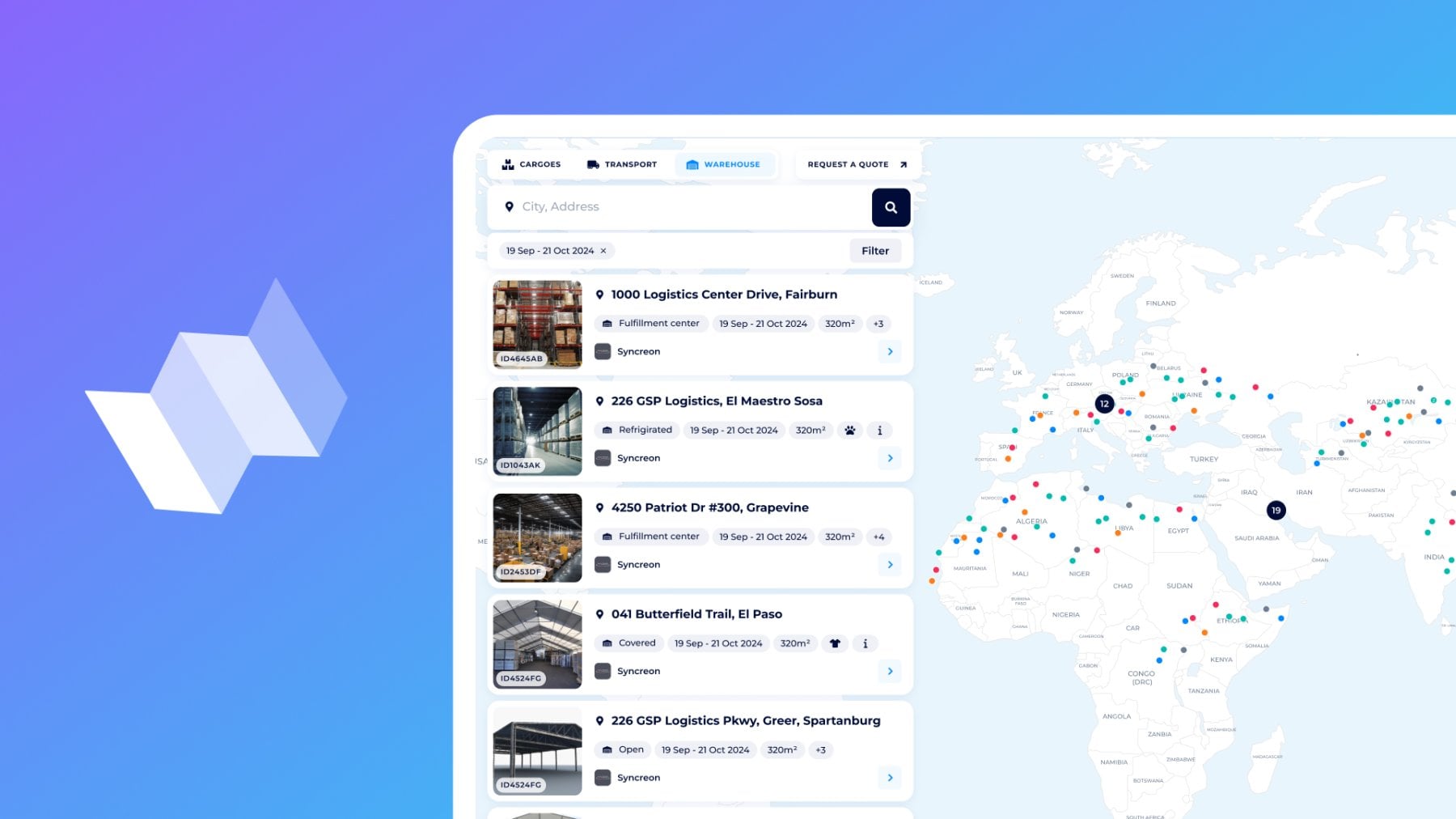
The right warehouse at the right moment can make or break your margin. Any urgent or long-term needs have to be met with instant matches. We have automated it with the “Warehouses” — the third tab of the Logistics Map.
“Warehouses” tab is 100% bidirectional:
- Shippers, freight forwarders, and traders post detailed storage requests and receive competitive offers in hours.
- Warehouse operators/owners and 3PLs promote their facilities 24/7 and fill empty square footage with hot, highly targeted leads.
Let’s explore the benefits for both sides: warehouse requests and service promotion.
Overview of the "Warehouses" tab
Go to the Logistics Map → click “Warehouses”.
The tool adapts to your role (Shipper or Carrier), whether you're looking for an available warehouse or providing storage services.
You instantly see thousands of warehouse cards on the left and color-coded pins on the world map.
Zoom into any region, and the map becomes your live storage dashboard.
For shippers, FFs, and traders: Get tailored storage in minutes
Post your warehouse request once and gather hundreds of verified storage providers/owners/operators in one place. Compare their offers by services, prices, and locations to complete warehousing for your cargo.
How to get a warehouse, storage, or facility?
There are two ways:
- place your new request for warehouse operators to quote
- choose available services from the list and the interactive map
To place your inquiry, click the Request a Quote button to fill out details:
- category of commodities
- Additional parameters for hazardous, perishable, oversized, or liquid cargo
- Warehouse type: open, covered, fulfillment center, or refrigerated
- mark if the warehouse should be bonded or not
- location (ZIP code is optional) and the allowed radius within the selected country, or not
- requested space for cargo
- booking period to search for warehouse service is available at the right time
- additional services can be included
- double-check all the details, any extra comments for the warehouse manager, and click on Send
Find the Request System overview here, or get it in the Mobile App.
That's it! Your request is automatically promoted to the warehouse carriers and is ready for quoting.
To choose available warehouses, let’s go to the interactive map:
1. Enter the country or city of the warehouse location you prefer and get a full list of available offers;
2. Explore warehouse cards:
- even without opening, you can see images and the store type, location, full size, available size, notes from the operator, and other extra services (storage, packing, custom clearance, and more)
- open the warehouse card to get full details on general info and services.
3. You can start the Chat with the SeaRates Support for any questions, copy the link to share with partners/customers, and directly Apply to book this warehouse on the necessary dates.
Filter the available warehouses by location, type, size, and extra services.
Zoom the Map to make warehouse searching even quicker if the location is the key parameter for you:
What’s in the result? To close any emergency needs, you can compare 20–100 real offers instead of calling the same 3 local warehouses. Accept the best services with one click for booking confirmation.
For warehouse operators/owners & 3PLs
For turning warehouse space into true revenue, you have to fill empty racks in a timely manner.
Do not just own or manage storage: catch increased occupancy of 15–35% (real numbers reported by DFA Members), fill seasonal or post-peak gaps you used to write off, solve the needs of shippers with niche facilities, and even attract international freight forwarders without sales trips.
How to promote your warehouse, storage, and facility?
Start with your Virtual Office Profile:
Go to the left side → the ‘Activity’ section → the ‘Facilities’ tab. This is your panel for warehouse asset management.
1. Click ‘Add a facility’
2. Enter the facility’s name
3. Choose warehouse type, address, total size, and available size you want to promote
4. Mention if there is bonded warehouse or not
5. Are you offering any extra services? Mark them with prices:
- storage
- packaging
- certification
- custom clearance
- palletization
- survey
- stuffing
- labeling
- fulfillment
- handling
6. Choose payment methods and provide photos and descriptions for wider info about your services to shippers who are interested.
7. Click on Save facility — you can Preview your facility card the way it is displayed to shippers on the Logistics Map Warehouses. Your warehouse appears with a pin on the map and climbs search rankings.
8. Also, you can edit any details, share links or delete the unit in your VO Dashboard — My Facilities list.
Use the Filter to mark your warehouses and find your card from the list. Here, you can delete the card or copy the link to share with your customers and partners all up-to-date information about your warehousing services.

What’s in the result? Automatically, you get two types of leads:
- Direct booking requests from shippers who see your free space
- Matched incoming requests pushed to you the moment they match your profile on SeaRates.com
Respond with a custom offer → close the deal!
Finally, you are stopping chasing a chance by staring at empty racks and receiving hot leads with targeted needs.
Web integration

There are more benefits to be gained by integrating this white-labeled tool into your site. You can manage requests for container storage depending on your position: shippers have their own tender platform, and warehouse operators can set up a branded map for lead generation and services promotion. Check the documentation and ask our team for an integration demo.
API connection

The Logistics Map API allows you to have warehouse data and request synchronization, create your application, and automate the entire workflow. The process is two-way: shippers gather warehousing offers, while owners promote assets and advertise their storage services.
- Upload of requests/storage units
- Leads generation and filtering into your ERP and WMS
- Management of dynamic pricing on warehousing
Request the API demo and access from our team, and sync with systems like SAP or custom dashboards.
Stop paying demurrage or staring at empty racks
Finally, here we are — at the third and final tab of the Logistics Map that makes this tool the only platform you’ll ever need for cargo shipping, transport management, and storage.
For advanced access and custom integrations, drop us a line at [email protected]. Do not miss our previous guides about the “Cargoes” and “Transport” tabs already live!